1. 重点
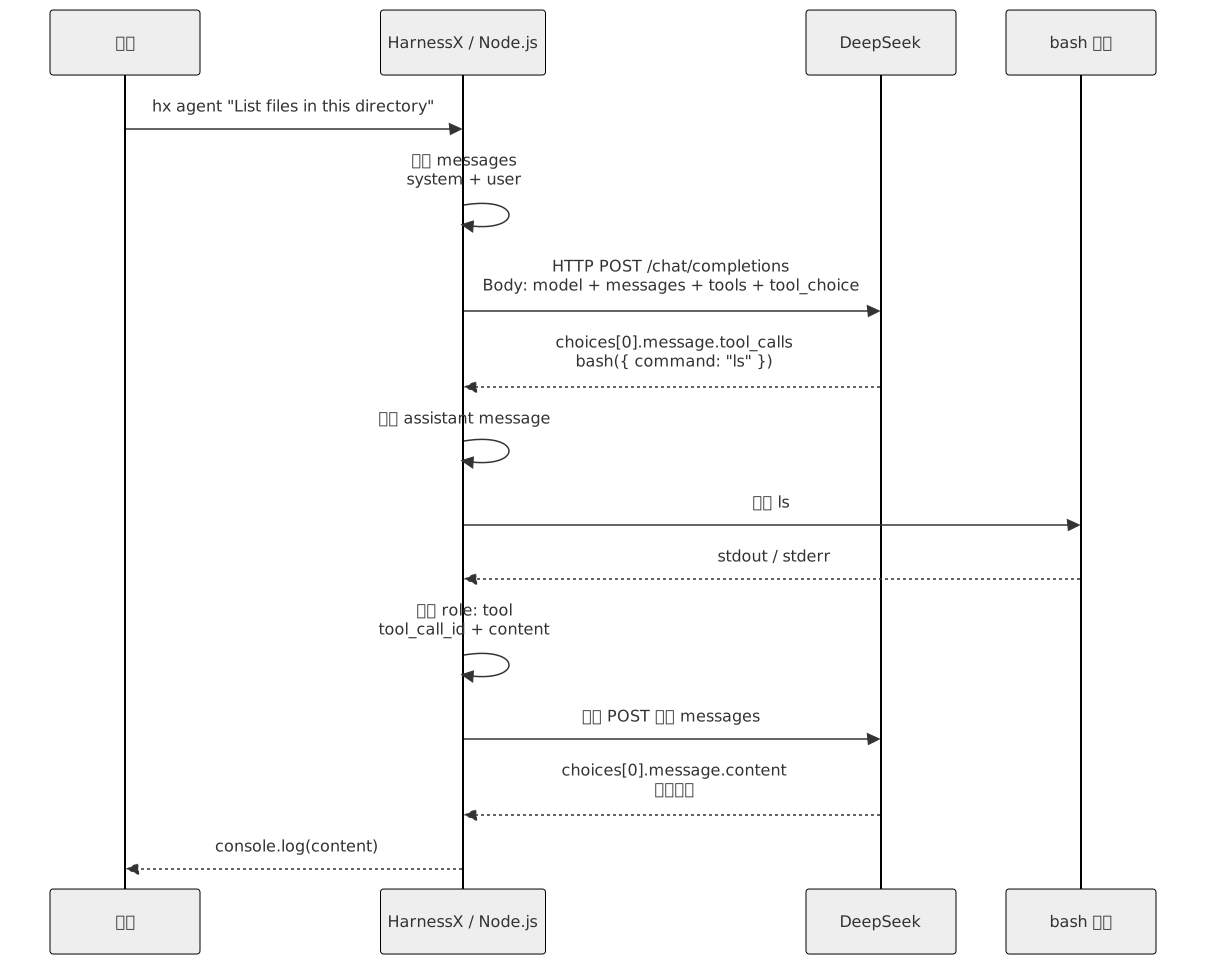
- 第 1 课真正要看懂的是这条链路:
- 用户敲
hx agent "List files in this directory"。 - Node.js 收到
agent命令和任务文本。 - 代码把任务变成
messages。 - 代码把
messages和bash工具定义一起发给 DeepSeek。 - DeepSeek 如果返回
tool_calls,程序就执行里面的 bash 命令。 - 程序把执行结果作为
role: "tool"消息追加回messages。 - 再次请求 DeepSeek。
- DeepSeek 不再返回
tool_calls时,程序打印最终回答,循环结束。
- 用户敲
- 当前这一课要做的是 Agent 循环:
- 一个循环。
- 一个 bash 工具。
- 模型决定要不要调用工具。
- HarnessX 负责执行工具,并把结果喂回模型。
这一课的第一性原理是:
最小 Agent 不是一个复杂框架。
它就是一个会反复调用模型、执行工具、回传结果的 while 循环。
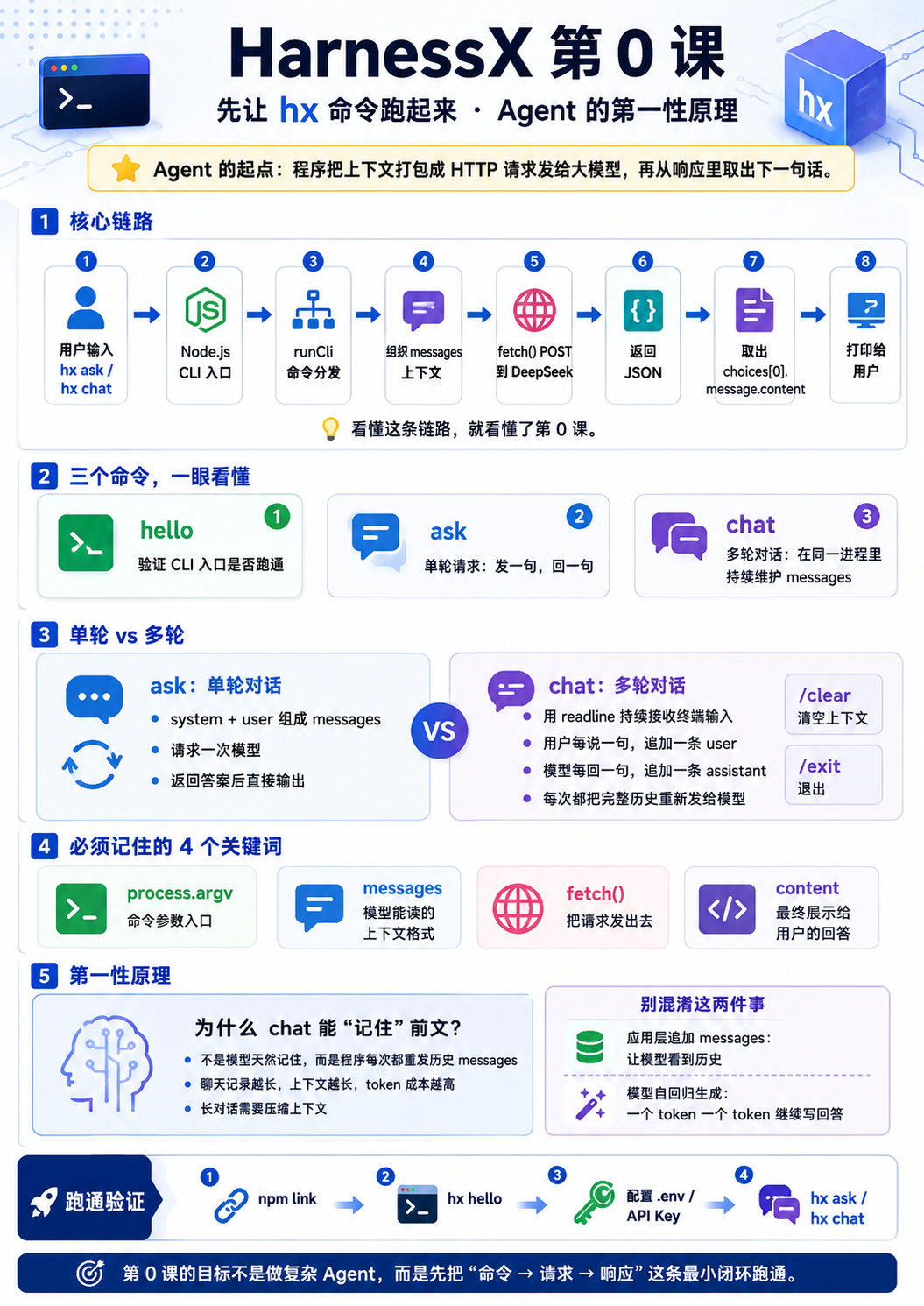
2. 流程图
2.1. HTTP 一来一回加工具回传
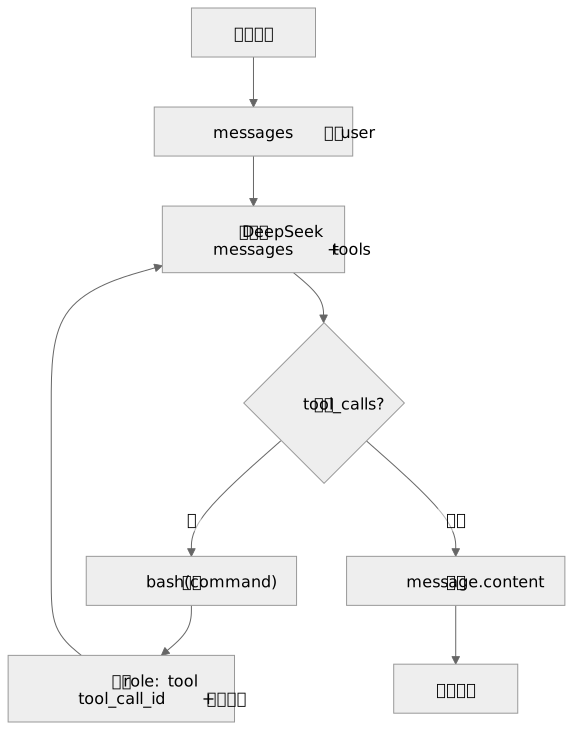
2.2. Agent Loop
2.3. messages 怎么变长

3. 入口
用户敲的是:
hx agent "List files in this directory"package.json 还是同一个入口。
{
  "bin": {
    "hx": "./src/index.js"
  }
}
src/index.js 第一行还是 shebang。
`#!/usr/bin/env` node

// 用户敲 hx,本质是执行这个 Node.js 文件。
真正进入业务代码的是:
runCli(process.argv.slice(2));

// 用户输入:
// hx agent "List files in this directory"
//
// 业务代码看到:
// ["agent", "List files in this directory"]
4. 命令分发
第 0 课已经有 hello、ask、chat。详见 HarnessX:第 0 课:先让 hx 命令跑起来、Agent 的第一性原理
第 1 课只新增一个分支。
if (command === "agent") {
  // hx agent 后面的内容就是用户任务。
  const task = rest.join(" ").trim();

  // 没有任务时只打印用法,不进入 Agent Loop。
  if (!task) {
    console.log('Usage: hx agent "List files in this directory"');
    return;
  }

  // 第 1 课的核心逻辑放在 runAgent:
  // 模型返回 tool_calls -> 执行 bash -> 把结果喂回模型。
  await runAgent(task);
  return;
}- 这里要看懂:
agent是课程入口。rest.join(" ").trim()是用户任务。runAgent()负责完整 Agent 循环。
5. 发出去的是什么
第 0 课只发 model + messages + stream。
第 1 课多发两个东西:
tools:- 告诉模型现在可以调用什么工具。
tool_choice: "auto":- 告诉模型自己决定要不要调用工具。
核心请求体长这样:
{
  "model": "deepseek-chat",
  "messages": [
    {
      "role": "system",
      "content": "You are a coding agent at /current/path. Use bash to solve the user's task."
    },
    {
      "role": "user",
      "content": "List files in this directory"
    }
  ],
  "stream": false,
  "tools": [
    {
      "type": "function",
      "function": {
        "name": "bash",
        "description": "Run a shell command in the current working directory.",
        "parameters": {
          "type": "object",
          "properties": {
            "command": {
              "type": "string",
              "description": "The shell command to run."
            }
          },
          "required": ["command"]
        }
      }
    }
  ],
  "tool_choice": "auto"
}
这一段很关键。
- 模型不会真的执行 bash。
- 模型只会返回一个结构化意图。
- 真正执行命令的是 HarnessX。
6. 怎么发出去
DeepSeek 请求仍然走 fetch()。
// requestBody 是真正发给 DeepSeek 的 JSON。
// 第 1 课会通过 options 额外塞入 tools 和 tool_choice。
const requestBody = {
  model,
  messages,
  stream: false,
  ...options,
};

const response = await fetch("https://api.deepseek.com/chat/completions", {
  method: "POST",
  headers: {
    // 告诉服务端:请求体是 JSON。
    "Content-Type": "application/json",

    // 让 DeepSeek 知道这次请求属于哪个账号。
    Authorization: `Bearer ${apiKey}`,
  },

  // fetch 的 body 必须是字符串,所以这里把对象转成 JSON 字符串。
  body: JSON.stringify(requestBody),
});
第 1 课把 DeepSeek 封装拆成两层。
export async function callDeepSeek(messages) {
  // 给 ask/chat 用:只返回 assistant 文本。
  const message = await callDeepSeekMessage(messages);

  // ask/chat 不关心 tool_calls,只打印 content。
  return message.content;
}

export async function callDeepSeekMessage(messages, options = {}) {
  // 给 agent 用:完整返回 assistant message。
  // 因为 tool_calls 不在纯文本 content 里。
}- 这样做的原因:
hx ask和hx chat仍然只关心文本。hx agent必须拿到完整 message。- 完整 message 里面才有
tool_calls。
7. 返回的是什么
如果模型决定调用工具,DeepSeek 返回的关键形状大概是:
{
  "choices": [
    {
      "message": {
        "role": "assistant",
        "content": null,
        "tool_calls": [
          {
            "id": "call_xxx",
            "type": "function",
            "function": {
              "name": "bash",
              "arguments": "{\"command\":\"ls\"}"
            }
          }
        ]
      }
    }
  ]
}
代码取的是:
// choices[0] 是这次请求的第一条模型结果。
// Agent Loop 不能只取 content,因为 tool_calls 也在 message 里。
const message = payload?.choices?.[0]?.message;
return message;
然后 Agent Loop 判断:
// DeepSeek 如果想调用工具,会把调用意图放到 message.tool_calls。
const toolCalls = message.tool_calls || [];
if (toolCalls.length === 0) {
  // 没有 tool_calls,就是最终回答。
  console.log(message.content);
  return;
}- 有
tool_calls:- 循环继续。
- 程序执行工具。
- 没有
tool_calls:- 模型已经给出最终回答。
- 打印
message.content。 - 循环结束。
这里和原教程有一个差异。
- 原教程用 Anthropic API:
- 看
stop_reason == "tool_use"。
- 看
- 当前 HarnessX 用 DeepSeek OpenAI 兼容 API:
- 看
message.tool_calls.length > 0。
- 看
概念一样,字段不同。
8. Agent Loop
最小循环就是这段。
// 最多跑 10 轮,避免模型一直调用工具。
for (let turn = 1; turn <= AGENT_MAX_TURNS; turn += 1) {
  // 每轮都把最新 messages 和工具列表发给模型。
  const message = await callDeepSeekMessage(messages, {
    tools: [BASH_TOOL],
    tool_choice: "auto",
  });

  // 模型刚才说了什么、要调用什么工具,都要进入下一轮上下文。
  messages.push(normalizeAssistantMessage(message));

  const toolCalls = message.tool_calls || [];
  if (toolCalls.length === 0) {
    // 模型不再调用工具,说明任务结束。
    console.log(message.content);
    return;
  }

  for (const toolCall of toolCalls) {
    // 模型只给出工具调用参数,真正执行工具的是本地程序。
    const output = await runToolCall(toolCall);

    // role: "tool" 是 OpenAI 兼容协议要求的工具结果消息。
    messages.push({
      role: "tool",
      tool_call_id: toolCall.id,
      content: output,
    });
  }
}

throw new Error(`Agent loop exceeded ${AGENT_MAX_TURNS} turns`);
runToolCall这个脚本执行以后的一些输出,要作为下一次的 message 的一个输入,然后传递给模型。
把它翻译成大白话:
- 先问模型下一步做什么。
- 如果模型给最终回答,就结束。
- 如果模型要用工具,就执行工具。
- 把工具结果塞回
messages。 - 再问模型下一步做什么。
- 最多跑 10 轮,避免模型一直调用工具停不下来。
这就是 Agent 循环。
normalizeAssistantMessage() 只保留下一轮协议需要的字段。
function normalizeAssistantMessage(message) {
  return {
    // 下一轮模型需要知道上一轮 assistant 的身份。
    role: "assistant",

    // tool_calls 场景下 content 可能是 null,这里显式保留 null。
    content: message.content ?? null,

    // 只有真的有工具调用时,才把 tool_calls 带入下一轮。
    ...(message.tool_calls?.length ? { tool_calls: message.tool_calls } : {}),
  };
}
9. bash 工具
当前只有一个工具:bash。
const BASH_TOOL = {
  // DeepSeek 使用 OpenAI 兼容的 function tool 协议。
  type: "function",
  function: {
    // 模型返回 tool_calls 时,会用这个 name 指明要调用 bash。
    name: "bash",
    description: "Run a shell command in the current working directory.",
    parameters: {
      type: "object",
      properties: {
        command: {
          type: "string",
          // 告诉模型:这里应该填真正要执行的 shell 命令。
          description: "The shell command to run.",
        },
      },
      // 没有 command,bash 工具就不知道要执行什么。
      required: ["command"],
    },
  },
};
为什么先只给 bash?
- bash 能读文件。
- bash 能列目录。
- bash 能运行程序。
- bash 能把 stdout / stderr 返回给程序。
- 对第一课来说,一个工具已经能讲清楚 Agent Loop。
真正执行命令的是 Node.js。
const result = await execAsync(command, {
  // 让命令运行在用户当前执行 hx 的目录。
  cwd: process.cwd(),

  // 教学版先给 120 秒,避免命令长时间卡住终端。
  timeout: 120000,

  // bash 输出可能很长,先放大 buffer,再在返回前截断。
  maxBuffer: 50000 * 4,

  // 明确使用 bash 执行模型给出的 command。
  shell: "/bin/bash",
});
当前只做教学版最小保护。
const DANGEROUS_COMMAND_PARTS = [
  // 这里只挡最明显的危险片段,不是完整权限系统。
  "rm -rf /",
  "sudo",
  "shutdown",
  "reboot",
  "> /dev/",
];- 这不是完整权限系统。
- 它只是避免最明显的危险命令。
- 真正的权限判断留到后面的课程。
这里要提醒自己一句:bash 的输出会作为
role: "tool"消息发回 DeepSeek;如果让模型读取.env、token 或私密代码,内容也会进入外部模型请求体。所以这一课只在临时目录或无敏感文件目录里跑 demo,真正产品后面必须补权限和沙箱。
10. 怎么跑
第一次先注册 hx。
npm link配置 DeepSeek。
cp .env.example .env.env 里填:
DEEPSEEK_API_KEY=你的 key
DEEPSEEK_MODEL=deepseek-chat
先确认已有命令还在。
hx --help
hx hello
hx ask "只回复 OK"
跑第 1 课。
hx agent "List files in this directory"也可以不访问真实模型,先测循环状态机。
HARNESSX_MOCK_TOOL_LOOP=1 \
HARNESSX_MOCK_BASH_COMMAND="printf mock-bash-output" \
hx agent "列出文件"
预期能看到:
$ printf mock-bash-output
mock-bash-output
mock-agent-final:mock-bash-output
可以观察到类似输出:
$ ls
README.md
package.json
src
...

当前目录下有 README.md、package.json、src 等文件。
再试一个更像 Agent 的任务:
hx agent "What is the current git branch?"观察重点不是它答了什么,而是:
- 模型什么时候返回
tool_calls。 - 程序执行了什么 bash 命令。
- 工具结果怎么变成下一轮
messages。 - 模型什么时候停止调用工具,改成最终回答。
11. 这一课真正要记住
tools:- 程序告诉模型可用工具的
schema。
- 程序告诉模型可用工具的
tool_calls:- 模型返回的工具调用意图。
function.arguments:- 模型给工具的 JSON 参数。
role: "tool":- 程序把工具执行结果回传给模型时用的消息角色。
tool_call_id:- 用来告诉模型这条工具结果对应哪一次工具调用。
- Agent Loop:
- 只要模型还在调用工具,程序就执行工具并把结果喂回去。
第 1 课最终要讲清楚的是这句话:
Agent 循环就是:
模型提出工具调用,程序执行工具,结果回到 messages,再把 messages 发给模型。
12. 源码
保留源码主流程,是为了以后代码继续变化时,还能回看这一课当时到底跑通了什么。
当前版本的关键文件只有三个。
src/index.js:- 负责
hx命令入口和命令分发。
- 负责
src/deepseek.js:- 负责把
messages发给 DeepSeek,并返回 assistant message。
- 负责把
src/agent-loop.js:- 负责 Agent 循环、bash 工具定义、工具执行和 tool result 回传。
主流程可以缩成这样:
// src/index.js
if (command === "agent") {
  // 把 hx agent 后面的所有参数重新拼成一个任务文本。
  const task = rest.join(" ").trim();

  // agent 命令必须有任务;没有任务时只提示用法,不进入循环。
  if (!task) {
    console.log('Usage: hx agent "List files in this directory"');
    return;
  }

  // 真正的 Agent Loop 放在 src/agent-loop.js,入口层只负责分发。
  await runAgent(task);
  return;
}
runAgent 如下:
// src/agent-loop.js
export async function runAgent(task) {
  // messages 是 Agent 的状态。
  // 第一条 system 规定角色和工作方式,第二条 user 是用户任务。
  const messages = [
    { role: "system", content: SYSTEM_PROMPT },
    { role: "user", content: task },
  ];

  // 不能裸跑 while true。
  // 模型如果一直要调用工具,最多 10 轮后主动报错退出。
  for (let turn = 1; turn <= AGENT_MAX_TURNS; turn += 1) {
    // 每一轮都把当前 messages 和 bash 工具定义发给 DeepSeek。
    // tool_choice: "auto" 表示让模型自己决定要不要调用工具。
    const message = await callDeepSeekMessage(messages, {
      tools: [BASH_TOOL],
      tool_choice: "auto",
    });

    // assistant message 必须追加回 messages。
    // 下一轮模型要看到自己刚才发起过什么 tool_calls。
    messages.push(normalizeAssistantMessage(message));

    const toolCalls = message.tool_calls || [];
    if (toolCalls.length === 0) {
      // 没有 tool_calls,说明模型已经给出最终回答,循环结束。
      console.log(message.content);
      return;
    }

    for (const toolCall of toolCalls) {
      // 模型只提出工具调用意图,真正执行 bash 的是 HarnessX。
      const output = await runToolCall(toolCall);

      // 工具结果必须用 role: "tool" 回填。
      // tool_call_id 用来告诉模型:这条结果对应哪一次工具调用。
      messages.push({
        role: "tool",
        tool_call_id: toolCall.id,
        content: output,
      });
    }
  }

  throw new Error(`Agent loop exceeded ${AGENT_MAX_TURNS} turns`);
}// src/deepseek.js
export async function callDeepSeekMessage(messages, options = {}) {
// requestBody 就是发给 DeepSeek 的 HTTP JSON。
// options 里会带 tools 和 tool_choice。
const requestBody = {
model,
messages,
stream: false,
...options,
};
// 模型调用本质还是一个普通 HTTP POST。
const response = await fetch(API_URL, {
method: "POST",
headers: {
"Content-Type": "application/json",
Authorization: `Bearer ${apiKey}`,
},
body: JSON.stringify(requestBody),
});
// Agent Loop 需要完整 assistant message。
// 因为 tool_calls 不在普通文本 content 里。
const payload = await response.json();
return payload?.choices?.[0]?.message;
}工具执行可以缩成这样:
// src/agent-loop.js
async function runToolCall(toolCall) {
  // 当前第一课只认识 bash 一个工具。
  if (toolCall.function?.name !== "bash") {
    return `Error: Unknown tool ${toolCall.function?.name || "(missing)"}`;
  }

  // DeepSeek 返回的 function.arguments 是 JSON 字符串。
  // 这里把它解析成 { command: "..." }。
  const command = parseCommand(toolCall.function.arguments);
  console.log(`$ ${command}`);

  // 执行命令后,把 stdout / stderr 文本作为 Observation 返回给模型。
  const output = await runBash(command);
  console.log(output.slice(0, 200));
  return output;
}
把三段合起来看:
hx agent
-> runCli 分发到 runAgent
-> runAgent 建立 messages
-> callDeepSeekMessage 发 HTTP 请求
-> DeepSeek 返回 tool_calls
-> runToolCall 执行 bash
-> role: tool 结果追加回 messages
-> 下一轮继续问模型
-> 没有 tool_calls 时打印最终回答
-> 超过 10 轮还没停就报错退出